
Entering the world of online financial trading can feel overwhelming. With complex charts, fast-moving prices, and technical jargon, complete beginners often feel hesitant to make their first trade. This is where a practice environment becomes an essential tool.
A practice account acts as a safe testing space, allowing you to build your skills without risking your hard-earned money. In this guide, we break down everything you need to know about the quotex demo account explained from scratch. You will learn how it works, how to navigate the platform, key differences between demo and live trading, and how to use this tool effectively to build genuine discipline.
What Is a Quotex Demo Account and How Does It Work?
A Quotex demo account is a simulated trading profile designed to replicate real market conditions. When you log into a demo platform, you are provided with virtual funds—typically set at $10,000—which you can use to place simulated trades across various assets.
The core mechanism of Quotex involves digital options trading. In this format, traders attempt to predict whether the price of an asset (such as a currency pair or commodity) will rise or fall within a specified timeframe. If your prediction is correct when the trade expires, you earn a percentage return based on the asset's yield. If your prediction is wrong, you lose the stake placed on that individual trade.
Because the demo account uses virtual credits, any profits or losses you record are strictly numerical. Nothing leaves your personal bank account, making it an ideal educational sandbox for total beginners.
Key Features of the Quotex Demo Platform
The Quotex demo interface is designed to match the live platform almost entirely. Key features include:
- Refillable Virtual Balance: You receive $10,000 in virtual funds, allowing you to practice without financial stress.
- Full Suite of Technical Tools: Access standard charting types (such as Japanese candlesticks, area charts, and bars) alongside popular indicators like Moving Averages, the Relative Strength Index (RSI), and Bollinger Bands.
- Wide Range of Assets: Practice trading across major currency pairs, digital assets, commodities like gold or oil, and market indices.
- Customizable Timeframes: Experiment with trade expiration times ranging from short 5-second or 1-minute durations to longer hourly settings.
- No Technical Installation Needed: The web-based platform runs directly in your web browser or mobile app, requiring no heavy software downloads.
Step-by-Step: How to Access and Start Using the Demo Account
Getting started on a demo platform requires minimal effort. Follow these simple steps to launch your practice environment:
Step 1: Visit the Official Site or Open the App
Navigate to the official Quotex platform through a desktop browser or download their official mobile application on your smartphone.
Step 2: Select Demo Mode
On the home screen, you will see an option to test the platform. Click on "Demo Account" or "Try Free Demo". Many users can immediately access the charting screen to test the interface.
Step 3: Register Your Details
To save your practice history and maintain access across devices, sign up using a valid email address and create a secure password. You will not need to submit identity verification documents just to use the demo mode.
Step 4: Explore the Dashboard
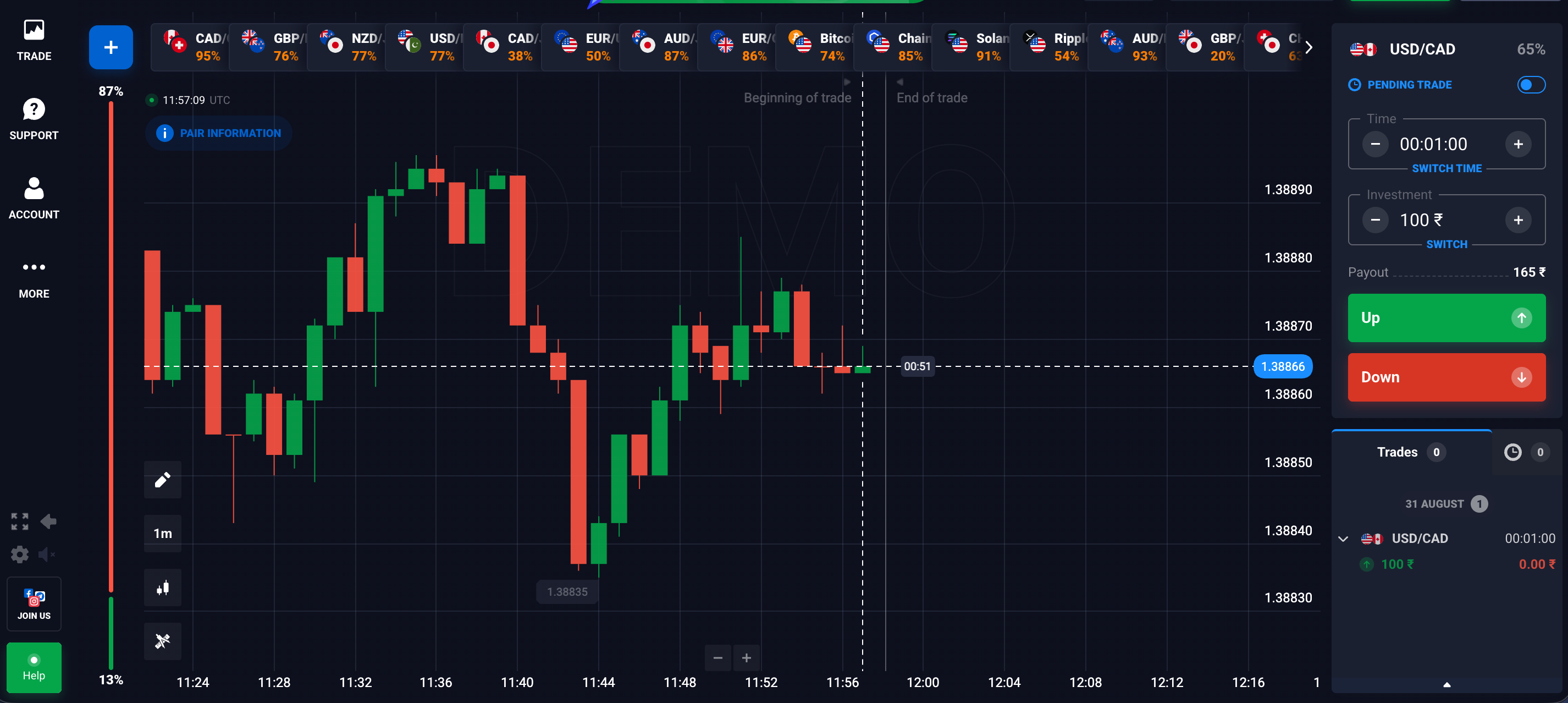
Take a moment to locate the core platform controls:
- Asset Menu (Top Left): Choose the market instrument you wish to observe.
- Timeframe Selector (Right Sidebar): Set how long your trade will run before expiring.
- Investment Amount (Right Sidebar): Select how much virtual money to place on a single trade.
- Directional Buttons (Green UP / Red DOWN): Click UP if you expect the price to rise above the current line, or DOWN if you expect it to fall.
Do You Need to Deposit Real Money to Use the Demo Account?
No. You do not need to deposit any real money, enter payment details, or connect a debit card to open and operate a Quotex demo account. It is completely free to use. If a website asks for credit card details simply to access a demo environment, verify that you are on the legitimate platform, as official demo tools do not require financial commitment.
How Do You Reset the Virtual Balance on a Quotex Demo Account?
If you experience losses while experimenting with high-risk ideas or early mistakes, your virtual balance may drop. Fortunately, resetting your virtual funds back to the default amount is quick and simple.
To top up your virtual account balance back to $10,000:
- Open your trading panel dashboard.
- Click on your current account balance display at the top corner of the screen.
- Select the option labeled "Reset Demo Balance" or click the refresh icon next to your virtual funds.
- Your account will instantly revert back to $10,000 in practice capital. You can repeat this process as many times as necessary during your learning phase.
Quotex Demo Account vs. Real Account: Key Differences
While the visual layout and core technical features are identical, trading with virtual money differs fundamentally from trading with real capital. Understanding these differences prevents realistic practice from turning into bad real-money habits.
Are Quotex Demo Market Prices Identical to Real Market Prices?
Yes. The chart prices, market quotes, candlestick formations, and technical indicator calculations displayed on the Quotex demo account mirror the data feeds used on the real trading account. The platform streams the exact same price action to both demo users and real account holders simultaneously.
This identical data feed is vital. It means that technical analysis patterns, support levels, and indicator crossovers behave exactly the same way in demo mode as they would on a live account.
Can You Withdraw Money Earned on a Quotex Demo Account?
No. Virtual profits earned within a demo account cannot be converted into real currency or withdrawn to a bank account, electronic wallet, or card. Demo funds represent simulated practice credits with zero cash value.
To withdraw real profits, you must transition to a real trading account, fund it with real money, trade successfully, and request a withdrawal according to standard platform procedures.
The primary non-technical difference between demo and live trading comes down to psychology:
- Absence of Emotional Pressure: In demo mode, losing $100 in virtual funds causes no personal hardship. In real trading, losing real money often triggers anxiety, fear, or impulsive reactions.
- Execution Discipline: Demo traders often hold trades loosely because there is no personal financial risk. Live traders must manage risk strictly to protect real capital.
Best Strategies to Practice on a Demo Account Before Live Trading
To gain maximum value from your practice time, treat the demo account like a professional flight simulator. Avoid treating it like a casual game. Here are effective strategies to build real skills:
1. Practice Fixed-Percentage Risk Management
Never place your entire virtual balance on a single trade. Practice allocating a small fixed percentage of your account balance per trade (for instance, 1% to 2%). If your balance is $10,000, keep your trade stakes around $100 to $200. This builds habits that protect your capital later.
2. Master Basic Technical Analysis
Use the demo charting tools to identify basic price patterns before opening position entries:
- Support and Resistance: Draw horizontal lines where market prices consistently bounce upward (support) or reject downward (resistance).
- Trend Confirmation: Use a simple indicator like a 20-period Moving Average to spot overall market direction. Consider trading in the direction of the dominant trend.
3. Keep a Practice Trading Journal
Track your trades in a notebook or spreadsheet. Record the asset name, entry reason, indicator setup, trade duration, and whether the trade won or lost. Reviewing your log helps you spot recurring errors and evaluate which technical setups work best for you.
4. Test Consistent Timeframes
Avoid jumping randomly between 5-second trades and 1-hour trades. Pick a consistent timeframe—such as 1-minute or 5-minute charts—and analyze how price moves over dozens of sample trades. Consistent testing yields reliable learning feedback.
Common Mistakes Beginners Make on Demo Accounts
Many new traders develop poor habits in demo environments that lead to quick losses when they later trade with real cash. Be aware of these common traps:
- Treating the Demo Balance Like "Monopoly Money": Placing massive, reckless trades simply because the money isn't real prevents you from learning real risk management. Treat every virtual dollar as if it came from your bank account.
- Over-Trading: Opening dozens of positions every minute leads to fatigue and messy analysis. Quality trades based on clear setups always beat volume.
- Switching Strategies Too Quickly: Abandoning a trading method after two consecutive losses is a common mistake. Every strategy experiences losing trades; test a method across 30 to 50 practice setups before deciding if it is useful.
- Rushing to Live Trading After a Lucky Streak: A few early wins on a demo account can create false confidence. Spend sufficient time practicing across different market conditions before considering live capital placement.
By understanding how the Quotex demo account functions and using it as a deliberate training sandbox, you can gain valuable experience, master essential tools, and build disciplined habits safely.

Comments
No comments yet.
Leave a comment
Comments are moderated and will appear after approval.