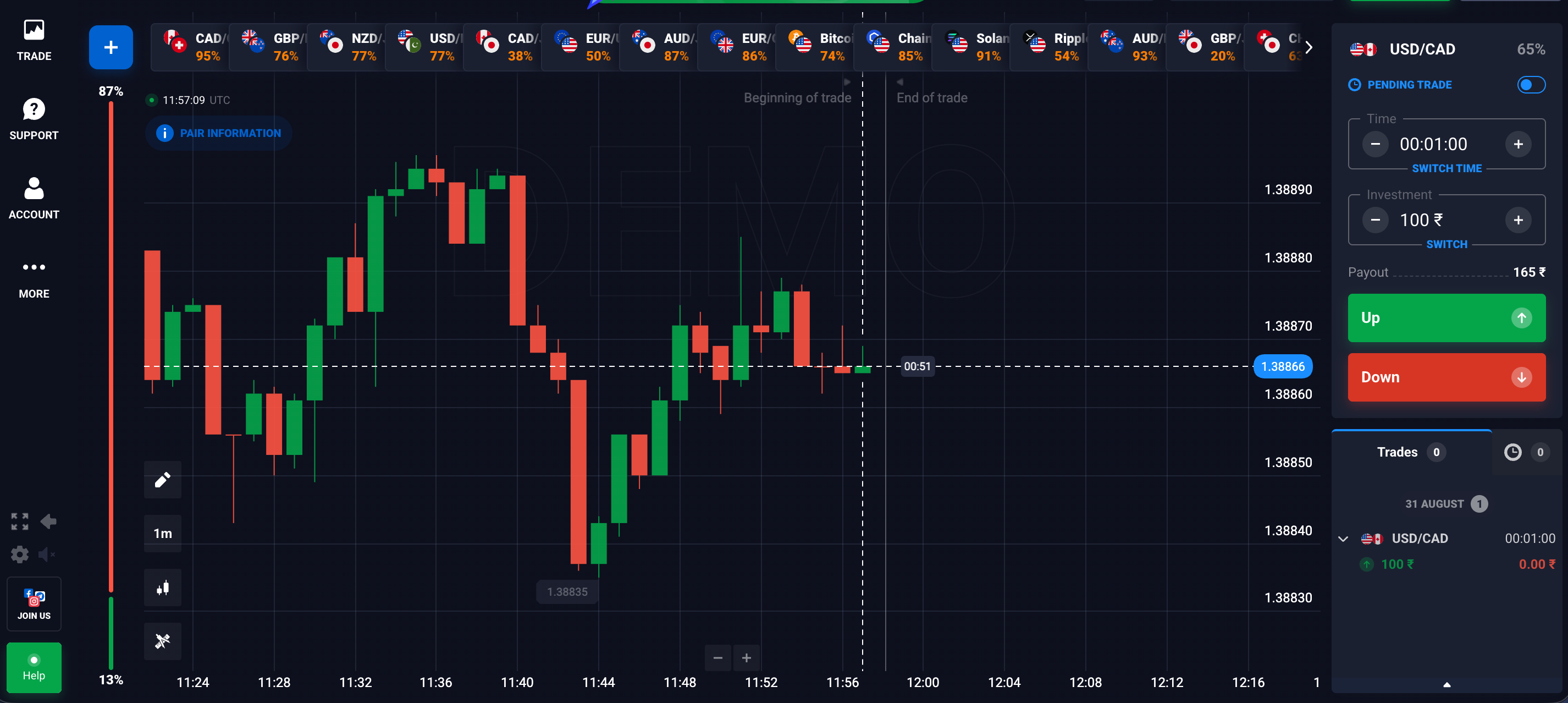
For an experienced market participant, a practice account is far more than a simple walkthrough of platform buttons. It serves as a controlled trading laboratory. When approaching the Quotex demo account with an intermediate mindset, the goal shifts from simply learning how to place a trade to systematically validating strategies, testing indicator confluence, and understanding trade execution mechanics.
Every professional strategy requires rigorous testing before capital risk is introduced. Utilizing a virtual environment allows traders to isolate technical performance from emotional bias, establishing a statistical baseline for win rates, average payouts, and risk parameters across diverse market conditions.
Understanding the Quotex Virtual Trading Environment
The virtual trading engine on Quotex is designed to simulate live market behavior, allowing traders to evaluate asset behavior across digital options and fast-paced market shifts. Understanding the framework of this environment helps ensure that data gathered during testing accurately reflects real market dynamics.
Do You Need Identity Verification for a Quotex Demo Account?
One primary structural advantage of the Quotex demo account is immediate access. Traders can initiate practice sessions without undergoing Know Your Customer (KYC) identity verification upfront. While live accounts ultimately require identity documents for full compliance and withdrawal processing, the demo environment bypasses these friction points.
This allows strategy developers to test platform responsiveness and chart tools instantly. You only need a basic registration to log in, preserving complete privacy while conducting market research and technical backtesting.
Does the Demo Environment Use Real-Time Market Data?
A testing ground is only as good as its underlying data feed. The Quotex demo account utilizes real-time market quotes derived from actual market price feeds across foreign exchange currency pairs, cryptocurrencies, commodities, and stock indices.
Because the price charts mirror live asset movements, technical indicators compute identical values on both demo and live interfaces. If a 14-period Relative Strength Index (RSI) registers an overbought condition on a live EUR/USD chart, the demo account reflects that exact structural calculation in real time. This accuracy ensures that price action patterns and technical setups retain their analytical validity.
Key Features Available on the Demo Dashboard
The Quotex platform integrates its full analytical suite directly into the virtual interface. Intermediate traders do not face restricted features or locked indicators when operating on virtual funds.
Exploring Integrated Technical Indicators and Charting Tools
Advanced strategy testing relies heavily on customization. The Quotex interface provides multiple charting formats and technical tools necessary for thorough market analysis:
- Chart Types: Toggle seamlessly between Japanese Candlesticks, Heikin Ashi, Area charts, and Bars to isolate structural trends and price momentum.
- Timeframes: Select chart intervals ranging from 5-second tick charts for ultra-short-term momentum analysis up to daily candles for macro structural bias.
- Drawing Tools: Utilize trendlines, support and resistance rays, Fibonacci retracements, and price channels to plot key market levels accurately.
- Technical Indicators: Access trend indicators like Moving Averages, Parabolic SAR, and Bollinger Bands, along with momentum oscillators such as the MACD, Stochastic Oscillator, and RSI.
By combining these visual tools, intermediate traders can construct complex, multi-layered entry and exit criteria without needing third-party charting software.
How to Access and Refill Your Virtual Funds
Managing virtual capital requires a disciplined operational approach. The demo environment provides complete control over your virtual balance, allowing you to mimic realistic trading accounts.
Initial Virtual Capital Provision
Upon setting up a practice account, Quotex populates the balance with $10,000 in virtual funds. For an intermediate trader, this balance should not be viewed as disposable play money. Instead, it should be treated as a fixed risk budget.
To extract meaningful strategy metrics, it is wise to adjust your trade sizes relative to this virtual balance in a way that reflects your intended real-world capital allocation. Trading with unrealistically high stakes on a demo account skews risk assessment and creates poor trading habits.
Step-by-Step: Resetting or Refilling Your Demo Balance
If your virtual account balance drops due to extended strategy testing—or if you want to reset your capital base to match a specific live deposit target—Quotex provides a simple reset mechanism:
- Locate the account balance dropdown in the top corner of the trading terminal.
- Ensure the toggle is set to the Demo Account profile.
- Click the Reset or Refill icon adjacent to the virtual balance display.
- Confirm the action to instantly restore the virtual capital back to its default $10,000 baseline.
This unlimited refresh capability allows traders to run consecutive test cycles, testing different asset classes or expiration profiles across multiple iterations.
Demo vs. Live Trading: Execution, Slippage, and Market Feeds
While the visual data matches across both environments, technical execution dynamics differ between virtual simulations and real-money order routing.
Comparing Execution Speeds and Platform Latency
In the demo environment, order execution is simulated locally on the platform server. When you click to enter a trade, the system instantly logs the contract at the displayed strike price without needing liquidity matching or external clearing.
In live trading, trade execution must process through live system architecture. While Quotex maintains low-latency execution pipelines, extreme market volatility can introduce minor micro-second delays. Intermediate traders must account for these subtle execution timing differences when designing high-frequency or short-duration strategies.
Understanding Slippage Variations Between Demo and Live Capital
Slippage refers to the difference between the expected price of a trade and the actual price at which it executes. In the demo account, slippage is practically non-existent because virtual orders do not require counterparty liquidity.
In contrast, live trading involves actual financial market conditions:
- Liquidity Gaps: Fast-moving news events can cause asset prices to skip specific price ticks, executing trades at the next available quote.
- Order Queueing: High transaction volume during major economic releases can create brief processing queues.
- Market Impact: Larger position sizes in live trading require sufficient liquidity at the requested strike price.
Recognizing these operational differences prevents unexpected performance gaps when transitioning a proven demo system into live market conditions.
Building and Testing Trading Strategies Risk-Free
The core objective for an intermediate trader using a practice account is establishing statistical validity. A strategy must prove its edge across a substantial sample size before real capital is deployed.
Forward-Testing Strategy Parameters Without Financial Risk
Rather than relying solely on historical backtesting, forward-testing in the demo account provides real-time validation of modern market behavior. Follow a systematic process to evaluate your trading setup:
- Define the Sample Size: Commit to executing a strict sample size of at least 50 to 100 consecutive trades using identical rules.
- Isolate Timeframes and Assets: Focus testing on specific currency pairs or assets during high-liquidity sessions (such as the London or New York market overlaps).
- Document Entry Confluence: Record exact entry triggers, such as a moving average cross combined with an overbought RSI reading and a candlestick rejection pattern.
- Log Performance Data: Track win-to-loss ratios, consecutive drawdowns, and net virtual return within a dedicated trading journal.
By strictly following a systematic rule set on demo data, you isolate strategy efficacy from operational mistakes or impulse trading.
Psychological Hurdles When Transitioning from Demo to Live Capital
The primary barrier intermediate traders encounter is not technical tool application, but psychological adaptation. A strategy that generates consistent performance in a demo environment can founder on a live account if emotional control breaks down.
Key Emotional Differences: Managing Real Risk vs. Virtual Funds
Trading with virtual funds completely removes financial self-interest and loss aversion. On a demo account, taking three consecutive losses causes zero physical or financial stress. The trader remains objective and clears the next valid signal without hesitation.
When real money is committed, psychological biases emerge immediately:
- Loss Aversion: The emotional pain of losing real capital can lead to hesitating on valid signals or closing trades early.
- Revenge Trading: After a losing trade, the urge to aggressively recover financial losses often leads to breaking position-sizing rules.
- Outcome Bias: Judging the quality of a trade solely by its monetary outcome rather than adherence to strict strategy rules.
Tips for a Seamless Transition to Real Trading
To bridge the emotional gap between virtual success and live execution, apply a structured, phased transition protocol:
- Scale Down Live Capital: Begin live trading with the smallest allowable contract sizes. Keep financial risk low enough that losses do not trigger emotional distress.
- Maintain Strict Consistency: Execute the exact parameters, indicators, and expiry settings validated during your demo testing phase. Do not invent new rules on a live account.
- Focus on Execution Quality: Evaluate daily performance based on strategy compliance percentage rather than monetary profit totals.
- Return to Demo When Needed: If execution errors or market shifts break your focus, temporarily return to the demo account to recalibrate your setups and rebuild confidence risk-free.


Comments
No comments yet.
Leave a comment
Comments are moderated and will appear after approval.