
For intermediate traders, a practice account is far more than a basic orientation tool. It serves as a private laboratory where you can refine entry timing, stress-test technical indicator combinations, and evaluate psychological discipline without putting capital at risk. A properly structured Quotex demo trading session setup allows you to mirror real market conditions while systematically measuring your edge.
Transitioning from beginner mechanics to structured strategy testing requires configuring your workspace for maximum efficiency. Below is a guide to optimizing your Quotex demo platform setup for professional-level backtesting and forward-testing.
Getting Started: Accessing Your Quotex Demo Dashboard
Accessing the demo environment on Quotex is designed to be seamless, letting traders jump straight into market analysis without unnecessary friction. However, understanding how the environment operates helps ensure a smooth transition to live trading later.
Quick Account Access and KYC Requirements
One primary advantage of the demo dashboard is immediate availability. Unlike live accounts that ultimately require identity verification before performing full withdrawal functions, the practice environment is accessible immediately upon registration.
- No Immediate Verification Required: You can launch the demo terminal without completing Know Your Customer (KYC) documentation, allowing you to begin technical evaluation instantly.
- Environment Parity: The demo platform utilizes the same web interface, charting tools, and price feeds as the live trading terminal, ensuring your visual and analytical experience remains identical across both environments.
- Account Switching: You can toggle between your demo and live balance directly from the upper navigation bar with a single click, allowing you to test setups before executing them on live accounts.
Navigating the Interface: Asset Selection, Expiry, and Investment Amounts
An organized workspace reduces decision fatigue during fast-moving trading sessions. Intermediate traders should customize asset watchlists and default trade parameters before placing their first practice order.
Choosing Currency Pairs, Commodities, and Crypto Assets
Quotex offers access to major forex pairs, cross-currency pairs, digital assets, and commodities. When preparing your session, focus on assets that match your trading system rather than choosing based solely on temporary payout fluctuations.
- Filtering by Payout Percentages: Asset payout rates fluctuate based on market liquidity and volatility. Select assets offering higher dynamic payout rates to maximize statistical efficiency during your testing sessions.
- Categorizing Volatility: Group your assets based on market conditions. For breakout testing, look for high-volatility pairs during major session overlaps (such as the London/New York session). For range-bound mean reversion tactics, focus on low-volatility pairs during quieter periods.
- OTC Asset Testing: Over-The-Counter (OTC) pairs are available when standard markets are closed. Use demo mode to study how OTC price action differs from standard market sessions before risking capital on them.
Configuring Expiry Windows and Stake Sizes
Precision timing is critical when trading digital options or short-term fixed-time contracts. The platform interface allows two distinct methods for setting trade durations:
Fixed Time vs. Expiration Time: You can set trades based on a countdown duration (e.g., 1 minute, 5 minutes) or select a specific clock time for expiration (e.g., 14:30). Intermediate traders should align this setting with their primary chart timeframe—for instance, choosing a 5-minute expiry when trading off 5-minute candlestick patterns.
Standardizing Stake Sizes: Avoid entering random trade amounts. Configure your default investment size based on a fixed percentage of your total demo account balance (such as 1% or 2%) to accurately reflect real-world position sizing rules.
Configuring Chart Types and Technical Indicators for Practice
Standard line charts obscure vital price action data. Setting up an advanced chart layout is essential for identifying support levels, chart patterns, and momentum shifts.
Selecting Candlestick, Heikin-Ashi, or Area Charts
The platform provides multiple display modes. Choose the chart type that aligns with your execution framework:
- Japanese Candlesticks: The preferred choice for price action traders. Candlesticks clearly display the open, high, low, and close (OHLC) prices, allowing you to identify rejection wicks and candle patterns.
- Heikin-Ashi: Ideal for trend-following strategies. Heikin-Ashi candles average price movements to smooth out market noise, making it easier to hold positions during strong trends.
- Area and Bar Charts: Useful for broad macro views or quick tick-level assessments, though generally less informative for technical timing than candles.
Applying and Testing Indicators on the Demo Platform
Avoid cluttering your screen with conflicting tools. Use your demo sessions to build a clean indicator template built around three key layers:
1. Trend Identification: Overlay Exponential Moving Averages (EMA 20 and EMA 50) to quickly determine directional bias and dynamic support/resistance zones.
2. Momentum Oscillators: Add a Relative Strength Index (RSI) or Stochastic Oscillator below the main chart to identify overbought or oversold conditions and potential divergence setups.
3. Volatility Measures: Apply Bollinger Bands or Average True Range (ATR) to gauge price volatility and anticipate impending market breakouts.
Executing Practice Trades and Monitoring Open Positions
Once your workstation layout is active, test how your execution mechanics perform under active market conditions.
Evaluating Demo Execution Speeds vs. Live Market Execution
While demo environments simulate real market price quotes, order routing occurs internally on virtual servers. Keep these operational factors in mind during your Quotex demo trading session setup:
- One-Click Trading: Enable the one-click trade feature in the interface settings to eliminate confirmation pop-ups. This step minimizes latency during fast short-term scalping sessions.
- Slippage Considerations: Demo trades generally execute instantly at the displayed strike price. Remember that live market orders may experience micro-slippage during high-impact economic news releases due to shifting order book liquidity.
Tracking Open Orders and Analyzing Trade History
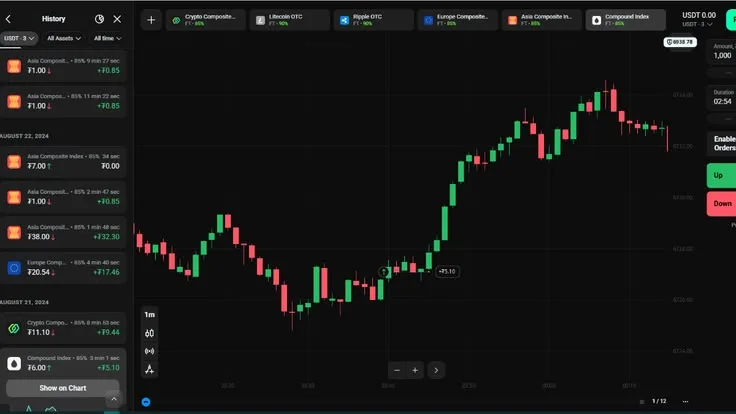
Use the side panel to review open contracts and past performance. Reviewing detailed trade logs helps identify systemic entry errors, such as trading against prevailing macro trends or entering late in an extended candle move.
Managing and Resetting Your Virtual Balance
The default demo account typically opens with a virtual balance of $10,000. However, trading with a bloated balance can distort your perception of risk if your intended live deposit is significantly smaller.
How to Replenish Virtual Funds When Capital Runs Out
If your demo balance drops low due to aggressive testing, or if you want to reset your statistics for a fresh session, Quotex provides a built-in reset function:
- Open your account profile or click on the balance dropdown menu at the top of the interface.
- Select the refresh or top-up button to instantly restore your virtual balance back to $10,000.
- Best Practice: If possible, adjust your position sizes so your active equity matches your planned live initial deposit (e.g., executing $5 trades if you plan to start with a $500 live balance).
Best Practices: Treating Virtual Capital Like Real Capital
The biggest challenge intermediate traders face in a demo environment is not technical mastery—it is psychological discipline. Without real monetary risk, it is easy to adopt sloppy habits like revenge trading or over-leveraging.
Building Trade Discipline and Realistic Risk Management Rules
To maximize the value of your practical testing, structure your demo sessions around professional operational rules:
- Establish a Daily Stop-Loss: Cap your demo session losses at a strict threshold (e.g., 3 consecutive losses or 5% of your balance). If you hit that limit, close the platform for the day.
- Maintain an External Trade Journal: Record every demo trade in a spreadsheet or journal. Document the entry signal, timeframe, asset payout rate, technical indicators used, and outcome.
- Test One Variable at a Time: Avoid altering multiple technical parameters simultaneously. Change one variable—such as moving from a 1-minute to a 5-minute expiry—and track performance across at least 30 to 50 sample trades to evaluate results accurately.


Comments
No comments yet.
Leave a comment
Comments are moderated and will appear after approval.